

TM 5-5420-280-23&P
0066 00
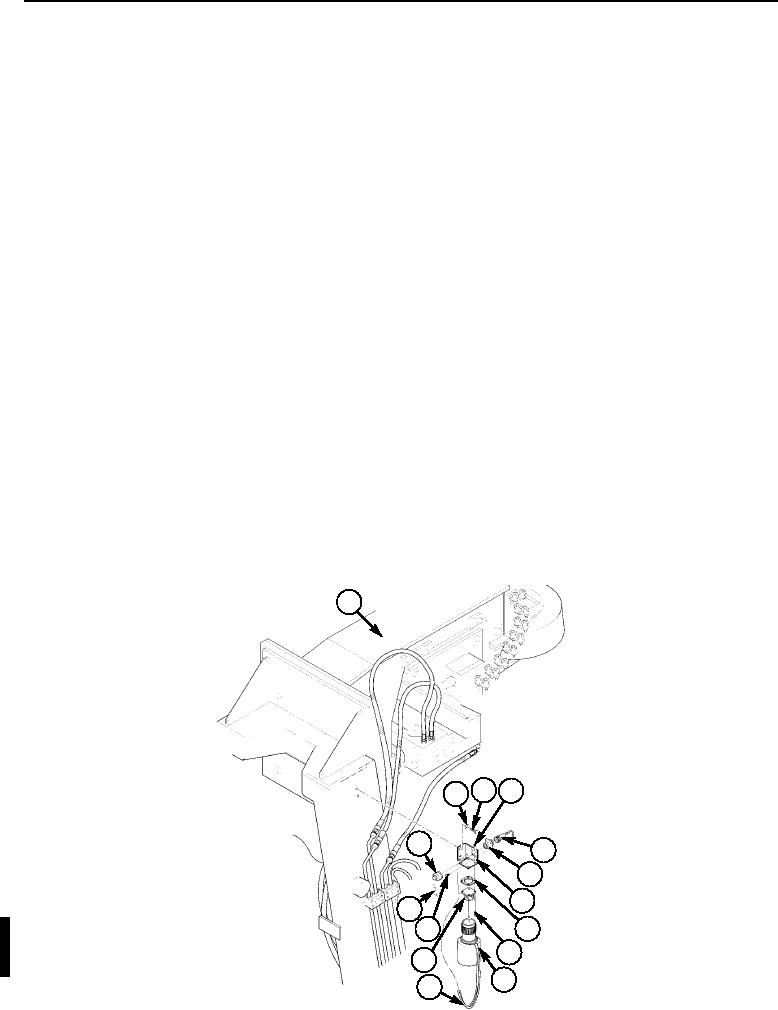
WINCH EMERGENCY SWITCH AND BRACKET REPLACEMENT (Contd)
REMOVAL
1. Disconnect jumper cable (5) from connector (6) on mounting bracket (7).
2. Remove two screws (3), washers (2), and bracket (7) with winch emergency switch (10) and
connector (6) attached from side of A-frame (1).
3. Disconnect winch emergency switch (10) from dummy receptacle (12) on bracket (7).
4. Disconnect emergency switch lanyard (11) from bracket (7).
5. Remove four nuts (4), screws (9), dummy receptacle (12), and gasket (8). Discard gasket (8).
6. Remove cap (15) from connector (6).
7. Remove four screws (13), chain (14), and connector (6) from bracket (7).
INSTALLATION
NOTE
Apply sealing compound to threads of all screws at installation.
1. Install connector (6) and chain (14) on bracket (7) with four screws (13).
2. Install cap (15) on connector (6).
3. Install dummy receptacle (12) on bracket (7) with new gasket (8), four screws (9), and nuts (4).
4. Connect emergency switch lanyard (11) on bracket (7).
5. Connect winch emergency switch (10) on dummy receptacle (12) on bracket (7).
NOTE
Apply sealing compound to threads of all screws at installation.
6. Install bracket (7) with winch emergency switch (10) and connector (6) attached on side of
A-frame (1) with two washers (2) and screws (3).
7. Connect jumper cable (15) on connector (6).
1
~
3
4
2
15
5
6
7
14
8
13
9
12
10
11
END OF WORK PACKAGE
Change 1
0066 00-2